 Ficelle
LLM fallback: handle rate limits, outages, and capability mismatches
A working LLM fallback reads the failure before it moves on. How to tell a Groq per-minute 429 from a daily cap, a Gemini project quota from a transient error, and an OpenRouter 402 from a 429, and where capability checks fit.
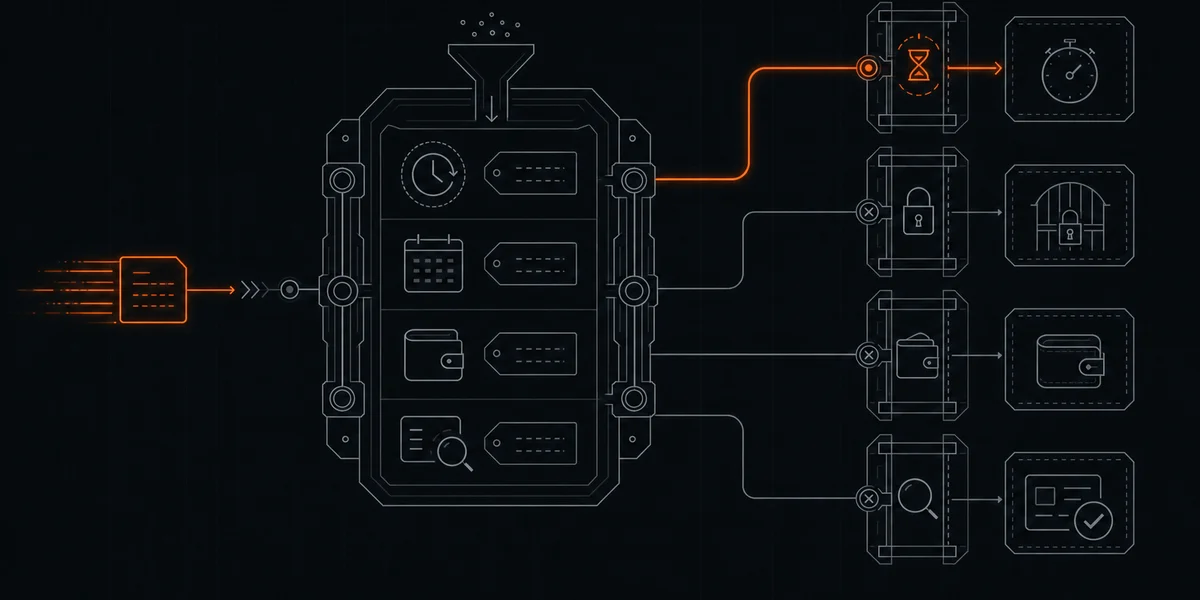
The usual LLM fallback is a list of model IDs and a loop: call the first one, and on any error call the next. That loop handles a provider outage. It handles a lot of other failures badly. It retries a daily cap every few seconds, moves to a second key that shares the same quota, sends a tool-calling request to a model that cannot call tools, and, if a paid model sits at the end of the list, turns an exhausted free tier into a bill.
A useful LLM fallback answers three questions before it moves a request: what failed, how long the failure lasts, and whether the next candidate can do the job. This guide walks through each one with the documented error semantics of three providers, then compares what OpenRouter, LiteLLM, and Ficelle handle for you.
Three different failures behind one “error”
Most fallback bugs come from treating these as the same event:
- Rate limits and quota exhaustion. The provider is up, but your organization, project, or key has spent its allowance for this minute or this day. The scope and the reset time decide what to do next.
- Outages and capacity errors. The provider or the model behind it is down, overloaded, or timing out. These are usually short and worth a bounded retry or a move to another provider.
- Capability mismatches. The model answers, but it cannot do what the request needs: a tool call, a JSON schema, an image input, a long prompt. Retrying the same model never fixes this one.
Retired model IDs (404 or 410) are a fourth case, covered in why provider breakage is the silent killer of AI agents. Treat them as permanent until a catalog check says otherwise.
Step 1: read the 429 before you retry it
A 429 tells you that a limit was hit. It does not tell you which one. Each provider exposes the scope differently.
Groq: two header families, one Retry-After
Groq’s rate limit documentation states that limits “apply at the organization level, not individual users”, and that you “can hit any limit type depending on which threshold you reach first.” Its response headers split into two groups that are easy to misread:
x-ratelimit-limit-requests,x-ratelimit-remaining-requests, andx-ratelimit-reset-requestsrefer to requests per day.x-ratelimit-limit-tokens,x-ratelimit-remaining-tokens, andx-ratelimit-reset-tokensrefer to tokens per minute.retry-afteris set only when you hit a limit and receive a 429. The other headers come with every response.
So a Groq 429 with x-ratelimit-remaining-requests: 0 means the daily request budget is gone, and retrying the same model in a few seconds will fail again. A 429 with requests remaining and tokens near zero is a per-minute token window; waiting for retry-after is reasonable. A long prompt can also exceed the per-minute token budget on its own, and no amount of waiting makes it fit on that model. The current per-model numbers are on the Groq provider page; the console values for your organization are authoritative.
Because the limits are per organization, a second Groq key in the same organization is not a fallback.
Gemini: per-minute rate versus daily quota, per project
Google’s Gemini rate limits page says “Rate limits are applied per project, not per API key”, and that requests-per-day quotas “reset at midnight Pacific time.” Its API error reference separates two 429 cases:
rate_limit_exceeded: “You have exceeded the per-minute or per-second request or token limit.” The suggested fix is to wait and retry with exponential backoff.quota_exceeded: “You have exceeded your daily quota.” The suggested fix is to wait until the quota resets or request an increase.
The same reference lists 400 failed_precondition for unmet prerequisites “(for example, disabled billing)” and 403 permission_denied for keys without access to a resource. Neither is a transient error, and Google’s troubleshooting guide advises against retrying client errors like 400 or 403.
The fallback consequence: when a Gemini project reports quota_exceeded, every key and model sharing that quota in the project is out until the Pacific-time reset. Fall back to a different provider, not to a new key in the same project. The Gemini provider page covers which models are on the free tier and the data terms that come with it.
OpenRouter: 402 is an account problem, 429 has two sources
OpenRouter’s error reference defines 402 as “Your account or API key has insufficient credits”, 429 as “You are being rate limited”, 502 as “Your chosen model is down or we received an invalid response from it”, and 503 as “There is no available model provider that meets your routing requirements.” Error bodies carry error.code, error.message, and an optional metadata object; for provider errors that metadata can include fields such as error_type and provider_code.
The limits page adds two details that matter for fallback:
- “If your account has a negative credit balance, you may see 402 errors, including for free models.” A 402 is not throttling. Retrying it, or switching to another
:freemodel on the same account, will not help until the balance is fixed. - A 429 can come from OpenRouter itself (free-model request caps or DDoS protection) or from the upstream provider “when the provider serving your request is rate limiting or at capacity.” Free variants are limited to 20 requests per minute and to 50 or 1,000 requests per day depending on credits purchased.
GET /api/v1/key returns limit_remaining and a free_model_daily_requests counter, so you can tell a spent daily free-model cap from an upstream capacity 429 before choosing between waiting and moving on. More detail is on the OpenRouter provider page.
Step 2: set retry boundaries by failure class
Once the failure is classified, the action follows from it:
| Failure | Typical signal | Retry the same model? | Move to another candidate? |
|---|---|---|---|
| Per-minute rate or token window | Groq 429 with tokens exhausted, Gemini rate_limit_exceeded, OpenRouter upstream 429 | After retry-after or a short backoff | Yes, if the wait is longer than the caller can tolerate |
| Daily cap or quota | Groq 429 with daily requests at zero, Gemini quota_exceeded, OpenRouter free-model daily counter spent | No, not before the reset | Yes, on a different organization, project, or provider |
| Account or billing state | OpenRouter 402, Gemini failed_precondition | No | Not on the same account; fix the account |
| Outage or capacity | 502, 503, timeouts | Briefly, with backoff | Yes |
| Request too large for the model | Context or token-per-minute limit the request can never fit | No | Yes, to a model with more room |
| Capability mismatch | Tool call ignored, invalid JSON, image rejected | No | Yes, to a model that passed the same check |
Two boundaries keep this from becoming a retry storm. Cap the number of attempts per request so one call cannot spin for minutes. And put a failing model on a cooldown instead of probing it with live traffic; LiteLLM’s reliability docs show the pattern with allowed_fails and cooldown_time settings that pull a model out of rotation after repeated failures.
Step 3: check capability before failover
A fallback list built from catalog metadata assumes every entry can serve every request. In practice a model can list tool support and still answer a tool-calling request with plain text, or accept a JSON mode flag and return malformed output. If your fallback moves an agent request from a model that failed on quota to one that cannot call tools, the agent breaks in a quieter way.
The fix is to filter candidates by the request’s needs before choosing one: tools if the request has tools, structured output if it asks for a schema, image input if it carries an image, enough context for the prompt. That filter is only as good as its data. Running a small probe per capability (one tool call, one JSON extraction, one image) catches models whose catalog entry overstates what they do. Ficelle’s model profiles publish which probes gate which virtual model.
What OpenRouter and LiteLLM already do well
You may not need to write this loop yourself.
OpenRouter’s model fallbacks let you pass a models array. If the first model fails, OpenRouter tries the next, and the documented triggers include “context length validation errors, moderation flags for filtered models, rate-limiting, downtime.” The response’s model field tells you which model answered, and “requests are priced using the model that was ultimately used.” That last line matters: if a paid model is in the array, a fallback to it is billed at its price. For a single hosted endpoint with provider routing built in, OpenRouter is a strong default.
LiteLLM’s proxy separates fallback by failure class out of the box: fallbacks for general errors such as rate limits, context_window_fallbacks for context-exceeded errors that it maps across providers, and content_policy_fallbacks for content-policy errors. Add num_retries and cooldown settings and you get much of the table above in a proxy you host yourself. If you want full control over routing logic and already run infrastructure, it is a good fit.
Neither tool decides for you that a fallback must stay free, and neither maintains a list of which free-tier models still work this week. Those parts remain your job.
Where Ficelle fits
Ficelle is a local, OpenAI-compatible router for free models. It runs on your machine at http://127.0.0.1:8646/v1, keeps provider keys local, and sends requests directly to the selected provider. It is not a hosted proxy. The core is source-available under the Business Source License 1.1.
Its fallback behavior, as documented on this site:
- A model or provider quota scope that errors or rate-limits goes on a cooldown, and Ficelle can retry another configured, enabled candidate that meets the request requirements and free-access checks. Recovery probes can restore eligibility later.
- Persistent failures, such as a retired model returning 404 or 410, are quarantined out of the pool.
- Tool-call, JSON, vision, and other capabilities are checked by probes rather than taken from catalogs. If a capability gate would exclude every candidate, Ficelle keeps the pool and labels the served model in the route log so the fallback is visible.
- The current changelog notes that a failing model is no longer retried through another provider, that a fully rate-limited request gets one delayed second chance, and that a per-minute token limit a request can never fit is remembered and skipped.
- Fallback never means paid. Under strict-zero routing,
allow_paid_fallbackis hardcodedfalse; when every free candidate is exhausted, Ficelle returns an error instead of spending. Quota-provider accounts can still bill beyond their allocation if the upstream account settings allow it, so keep those accounts within their free entitlement.
Some limits apply. An error is the outcome when the free pool is out, and your agent needs to handle it. Free models are also not equal to paid ones on every task: in Ficelle’s 76-task benchmark, paid models won 50% of the long-form writing tasks. Keep polished customer-facing writing on a paid model or edit it by hand.
The routing core is free to run. Groq and Gemini ship in Ficelle Pro’s maintained provider pack, and Pro ships fixes when a provider breaks. If keeping a hand-built fallback table current is the part you would rather not own, see maintained Ficelle plans.
